promptfoo configuration
The YAML configuration format runs each prompt through a series of example inputs (aka "test case") and checks if they meet requirements (aka "assert").
Asserts are optional. Many people get value out of reviewing outputs manually, and the web UI helps facilitate this.
Examples
Let's imagine we're building an app that does language translation. This config runs each prompt through GPT-3.5 and Vicuna, substituting three variables:
prompts: [prompt1.txt, prompt2.txt]
providers: [openai:gpt-3.5-turbo, localai:chat:vicuna]
tests:
  - vars:
      language: French
      input: Hello world
  - vars:
      language: German
      input: How's it going?
For more information on setting up a prompt file, see input and output files.
Running promptfoo eval over this config will result in a matrix view that you can use to evaluate GPT vs Vicuna.
Auto-validate output with assertions
Next, let's add an assertion. This automatically rejects any outputs that don't contain JSON:
prompts: [prompt1.txt, prompt2.txt]
providers: [openai:gpt-3.5-turbo, localai:chat:vicuna]
tests:
  - vars:
      language: French
      input: Hello world
      assert:
        - type: contains-json
  - vars:
      language: German
      input: How's it going?
We can create additional tests. Let's add a couple other types of assertions. Use an array of assertions for a single test case to ensure all conditions are met.
In this example, the javascript assertion runs Javascript against the LLM output. The similar assertion checks for semantic similarity using embeddings:
prompts: [prompt1.txt, prompt2.txt]
providers: [openai:gpt-3.5-turbo, localai:chat:vicuna]
tests:
  - vars:
      language: French
      input: Hello world
      assert:
        - type: contains-json
        - type: javascript
          value: output.toLowerCase().includes('bonjour')
  - vars:
      language: German
      input: How's it going?
      assert:
        - type: similar
          value: was geht
          threshold: 0.6   # cosine similarity
More advanced usage
You can use defaultTest to set an assertion for all tests. In this case, we use an llm-rubric assertion to ensure that the LLM does not refer to itself as an AI.
prompts: [prompt1.txt, prompt2.txt]
providers: [openai:gpt-3.5-turbo, localai:chat:vicuna]
defaultTest:
  assert:
    - type: llm-rubric
      value: does not describe self as an AI, model, or chatbot
tests:
  - vars:
      language: French
      input: Hello world
      assert:
        - type: contains-json
        - type: javascript
          value: output.toLowerCase().includes('bonjour')
  - vars:
      language: German
      input: How's it going?
      assert:
        - type: similar
          value: was geht
          threshold: 0.6
Testing multiple variables in a single test case
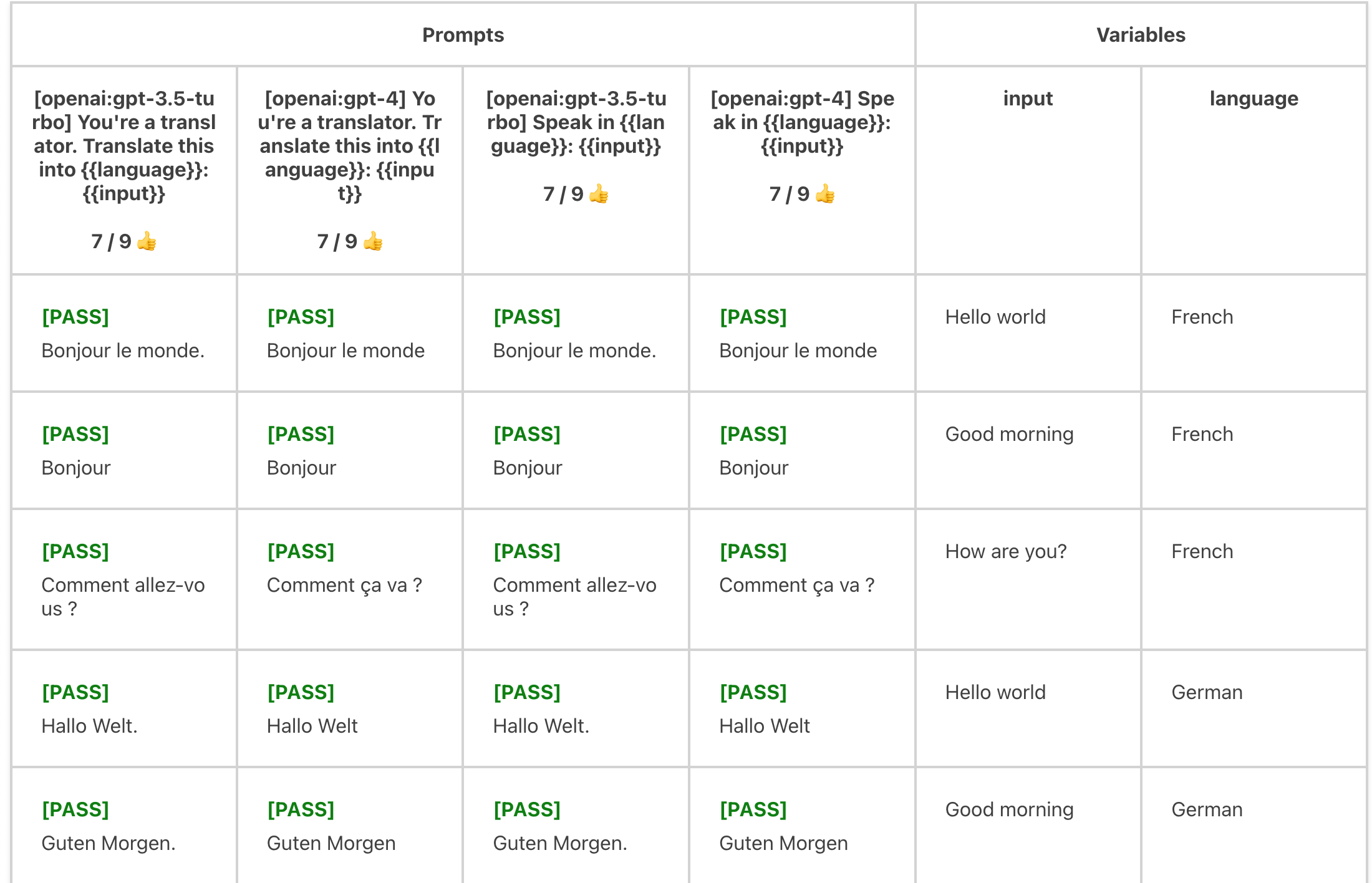
The vars map in the test also supports array values. If values are an array, the test case will run each combination of values.
For example:
prompts: prompts.txt
providers: [openai:gpt-3.5-turbo, openai:gpt-4]
tests:
  - vars:
      language: [French, German, Spanish]
      input: ['Hello world', 'Good morning', 'How are you?']
    assert:
      - type: similar
        value: 'Hello world'
        threshold: 0.8
Evaluates each language x input combination:
Other capabilities
promptfoo supports OpenAI functions and other provider-specific configurations. To use, override the config key of the provider. See example here.
Configuration structure
Here is the main structure of the promptfoo configuration file:
Config
| Property | Type | Required | Description |
|---|---|---|---|
| description | string | No | Optional description of what your LLM is trying to do |
| providers | string | string[] | Record<string, {config: any}> | Yes | One or more LLM APIs to use |
| prompts | string | string[] | Yes | One or more prompt files to load |
| tests | string | Test Case [] | Yes | Path to a test file, OR list of LLM prompt variations (aka "test case") |
| defaultTest | Partial Test Case | No | Sets the default properties for each test case. Useful for setting an assertion, on all test cases, for example. |
| outputPath | string | No | Where to write output. Writes to console/web viewer if not set. |
Test Case
A test case represents a single example input that is fed into all prompts and providers.
| Property | Type | Required | Description |
|---|---|---|---|
| description | string | No | Optional description of what you're testing |
| vars | Record<string, string | string[]> | No | Key-value pairs to substitute in the prompt |
| assert | Assertion[] | No | Optional list of automatic checks to run on the LLM output |
| options | Object | No | Optional additional configuration settings |
| options.prefix | string | No | This is prepended to the prompt |
| options.suffix | string | No | This is append to the prompt |
| options.provider | string | No | The API provider to use for LLM rubric grading |
| options.rubricPrompt | string | No | The prompt to use for LLM rubric grading |
Assertion
More details on using assertions, including examples here.
| Property | Type | Required | Description |
|---|---|---|---|
| type | string | Yes | Type of assertion |
| value | string | No | The expected value, if applicable |
| threshold | number | No | The threshold value, only applicable for type=similar (cosine distance) |
| provider | string | No | Some assertions (type = similar, llm-rubric) require an LLM provider |
promptfoo supports .js and .json extensions in addition to .yaml.
It automatically loads promptfooconfig.*, but you can use a custom config file with promptfoo eval -c path/to/config.
Loading tests from CSV
YAML is nice, but some organizations maintain their LLM tests in spreadsheets for ease of collaboration. promptfoo supports a special CSV file format.
prompts: [prompt1.txt, prompt2.txt]
providers: [openai:gpt-3.5-turbo, localai:chat:vicuna]
tests: tests.csv