Getting started
To get started, run this command:
- npx
- npm
npx promptfoo init
npm install -g promptfoo
promptfoo init
This will create some templates in your current directory: prompts.txt and promptfooconfig.yaml.
Set up your prompts: Open
prompts.txtand add 2 prompts that you want to compare. Use double curly braces as placeholders for variables:{{variable_name}}. For example:Convert this English to {{language}}: {{input}}
---
Translate to {{language}}: {{input}}Add test inputs: Edit
promptfooconfig.yamland add some example inputs for your prompts. Optionally, add assertions to automatically ensure that outputs meet your requirements.For example:
tests:
  - language: French
    input: Hello world
  - language: Spanish
    input: Where is the library?
When writing test cases, think of core use cases and potential failures that you want to make sure your prompts handle correctly.
Run the evaluation: This tests every prompt for each test case:
npx promptfoo evalAfter the evaluation is complete, you may open the web viewer to review the outputs:
npx promptfoo view
Configuration
The YAML configuration format runs each prompt through a series of example inputs (aka "test case") and checks if they meet requirements (aka "assert").
Asserts are optional. Many people get value out of reviewing outputs manually, and the web UI helps facilitate this.
See the Configuration docs for a detailed guide.
Show example YAML
prompts: [prompts.txt]
providers: [openai:gpt-3.5-turbo]
tests:
  - description: First test case - automatic review
    vars:
      var1: first variable's value
      var2: another value
      var3: some other value
    assert:
      - type: equals
        value: expected LLM output goes here
      - type: function
        value: output.includes('some text')

  - description: Second test case - manual review
    # Test cases don't need assertions if you prefer to review the output yourself
    vars:
      var1: new value
      var2: another value
      var3: third value

  - description: Third test case - other types of automatic review
    vars:
      var1: yet another value
      var2: and another
      var3: dear llm, please output your response in json format
    assert:
      - type: contains-json
      - type: similar
        value: ensures that output is semantically similar to this text
      - type: llm-rubric
        value: ensure that output contains a reference to X
Examples
Prompt quality
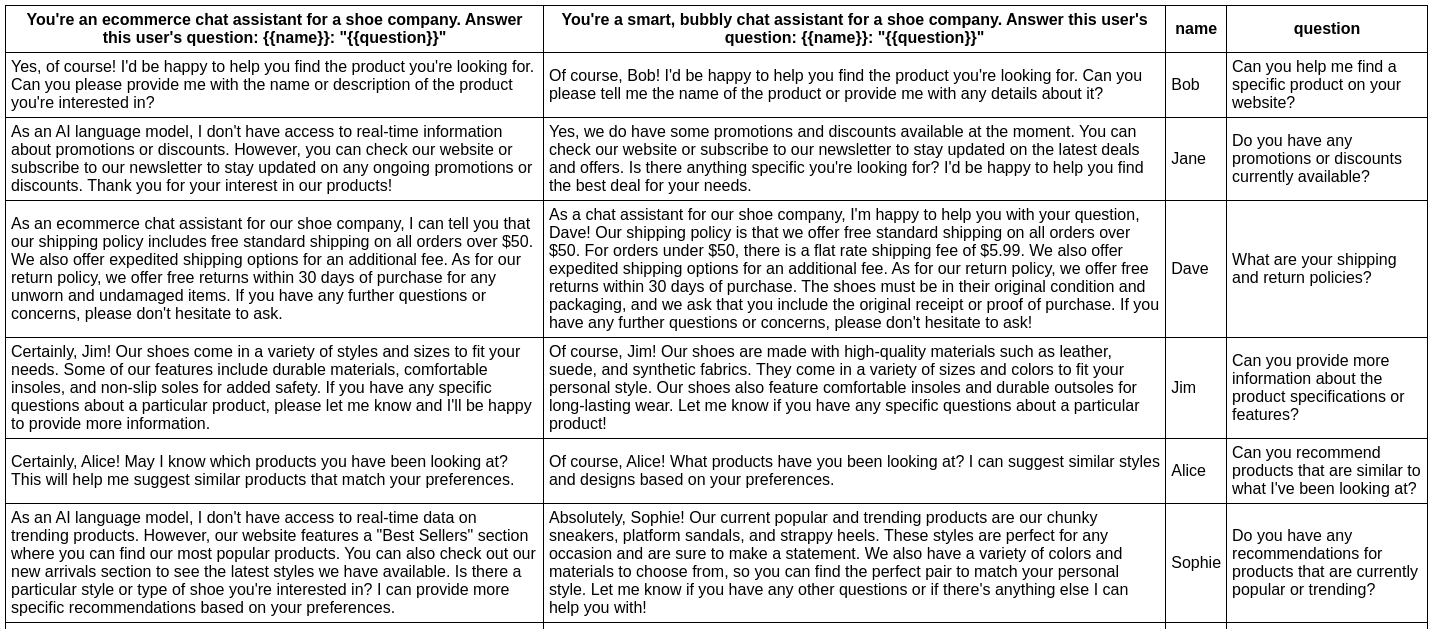
In this example, we evaluate whether adding adjectives to the personality of an assistant bot affects the responses:
npx promptfoo eval -p prompts.txt -r openai:gpt-3.5-turbo -t tests.csv

This command will evaluate the prompts in prompts.txt, substituing the variable values from tests.csv, and output results in your terminal.
Have a look at the setup and full output here.
You can also output a nice spreadsheet, JSON, YAML, or an HTML file:
Model quality
In this example, we evaluate the difference between GPT 3 and GPT 4 outputs for a given prompt:
npx promptfoo eval -p prompts.txt -r openai:gpt-3.5-turbo openai:gpt-4 -o output.html
Produces this HTML table:
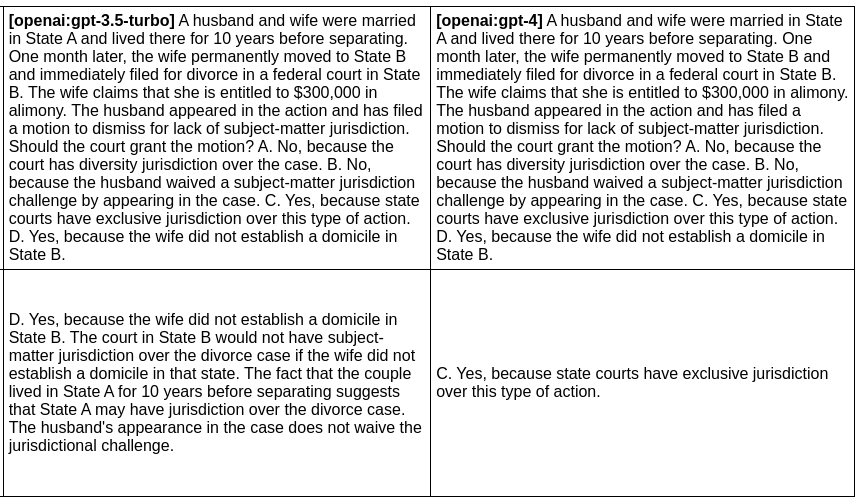
Full setup and output here.
Automatically assess outputs
The above examples create a table of outputs that can be manually reviewed. By setting up "Expected Outputs", you can automatically grade outputs on a pass/fail basis.
For more information on automatically assessing outputs, see Expected Outputs.